What the Company Does
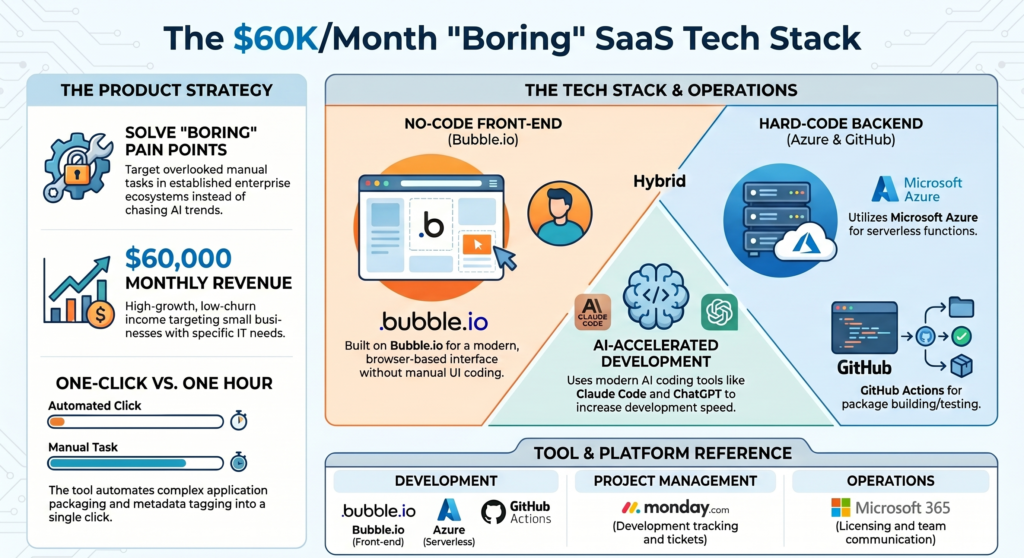
The company, called Packager, solves a time-consuming problem for IT (Information Technology) workers. Imagine an IT administrator needs to install a new program on hundreds of company computers. Normally, they have to manually set up or “package” the application to make sure it installs correctly, which can take an hour for just one app. Packager is a simple website tool that automates this entire chore into a one-click process. The IT worker just picks an app from a menu and clicks a button; Packager’s servers then automatically prepare the software and send it to all the company’s computers using a system called Microsoft Intune. In short, it takes a boring, hour-long computer task and does it instantly.
0-1000 User Framework and Marketing Strategy
To get its first users and grow, the founder followed a step-by-step framework:
- Initial Launch on Reddit: The founder first released a basic, free version (an MVP) on Reddit. This helped quickly attract users who tested the product and gave valuable feedback to fix early bugs.
- Introducing a Paywall: After stabilizing the platform based on that initial Reddit feedback, the company ended the free beta phase and introduced a $25 per month subscription fee. By charging early, the founder validated that customers actually valued the tool enough to pay for it.
- Marketing via Partnerships: To scale the business, the main marketing strategy was partnering with industry experts known as “Microsoft MVPs”. These experts created video demos of Packager on YouTube. This placed the tool directly in front of a highly targeted audience. The founder views this as “planting seeds,” because a YouTube video can be discovered by new customers years after it is uploaded, resulting in a massive return on investment.
Tech Stack Used to Build the App
The founder built the application using the following technologies:
- Bubble.io: Used to build the front-end user interface.
- GitHub Actions: Used for hosting the code, testing, and managing the application builds.
- Microsoft Azure: Used to run backend serverless functions.
- Monday.com: Used to track development progress and manage support tickets.
- Microsoft 365: Used for staff software licensing.
Read more about Solo businesses.
Solo businesses – Jackie Chow, Journalable, Locked, Cut Coach

Hi Friends, This is Swapnil; I love reading and sharing knowledge. Currently working as a content writer at startupsunion.com. You all can hang out with me here.